
SiteGalaxy for WordPress
The Internal Linking Tool That Shows What's Really Going On
SiteGalaxy is an internal linking tool for WordPress that scans every page and post on your site and maps how they actually link together. You'll see which pages are buried, which ones nothing points to, and how far each one sits from your homepage. Then you get a step-by-step plan to put it back in order.
Why Sites Drift
Your Menu Says One Thing. Your Links Say Another.
Sites grow one page at a time. A new service page goes up, a blog post links to whatever was handy that week, and an old landing page never quite gets retired. The menu still looks tidy, so nobody notices.
Search engines and AI assistants don't read your menu the way a visitor does. They follow your internal links, and those links decide which pages look important. When the links drift away from how you'd organize the site on paper, your best pages end up four clicks deep while an outdated one gets all the attention.
Who Uses SiteGalaxy
Built for the People Who Own the Site
Business owners
You know the site has grown messy but can't tell where the trouble is. SiteGalaxy shows you in one scan.
Marketing teams
You publish constantly and need to know the new pages are actually connected to the ones that sell.
Agencies
You manage dozens of client sites. Run them from one dashboard and hand each client a report under your own brand.
How It Works
Scan It, See It, Fix It
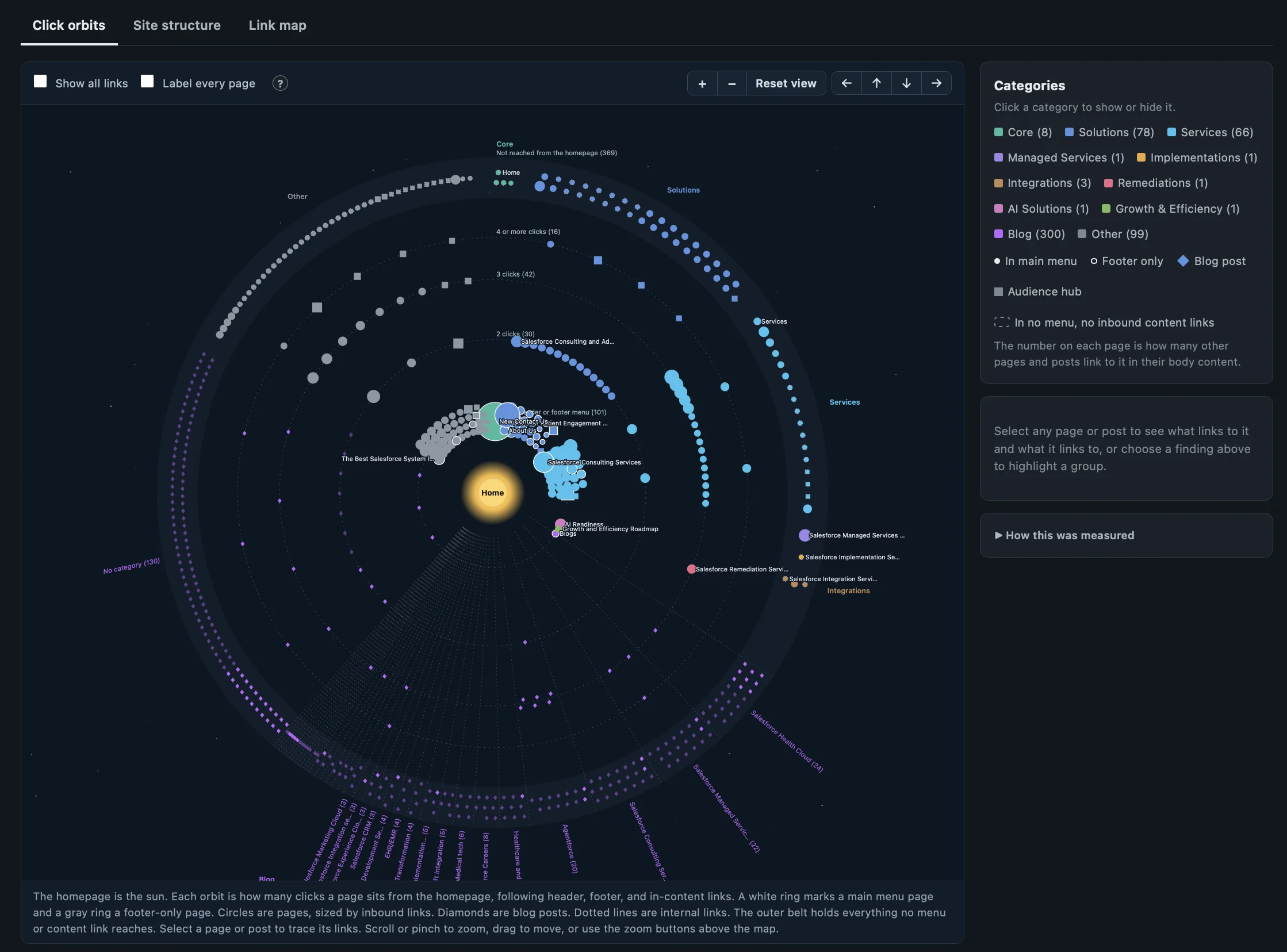
Scan your whole site
SiteGalaxy reads every published page and post and every internal link between them, then places each page on a ring by how many clicks it takes to reach from your homepage. Most sites finish in a few minutes.
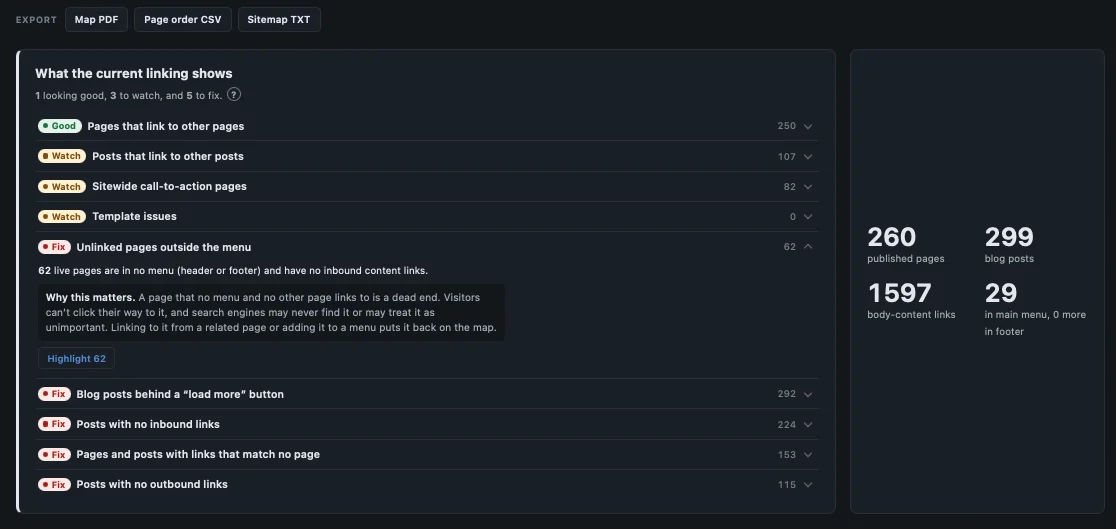
Know what needs fixing
Every scan ends with a plain-English summary of what your linking shows. Each finding is marked Good, Watch, or Fix, with a count: pages no menu or other page links to, posts nothing points to, blog posts hidden behind a "load more" button, links that lead to pages that no longer exist. Open any finding to see why it matters, then highlight those pages on the map.
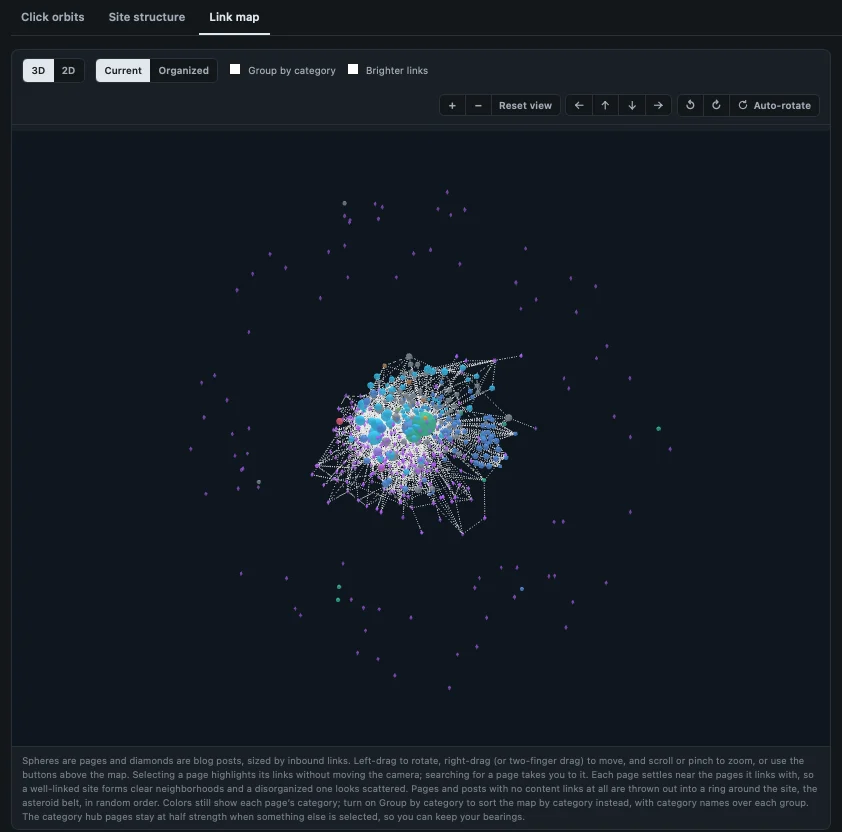
See the real structure
The link map draws each page as a node and each link as a path, with moving dots that show which way every link points. Clusters, dead ends, and pages hanging on by a single link stand out right away.
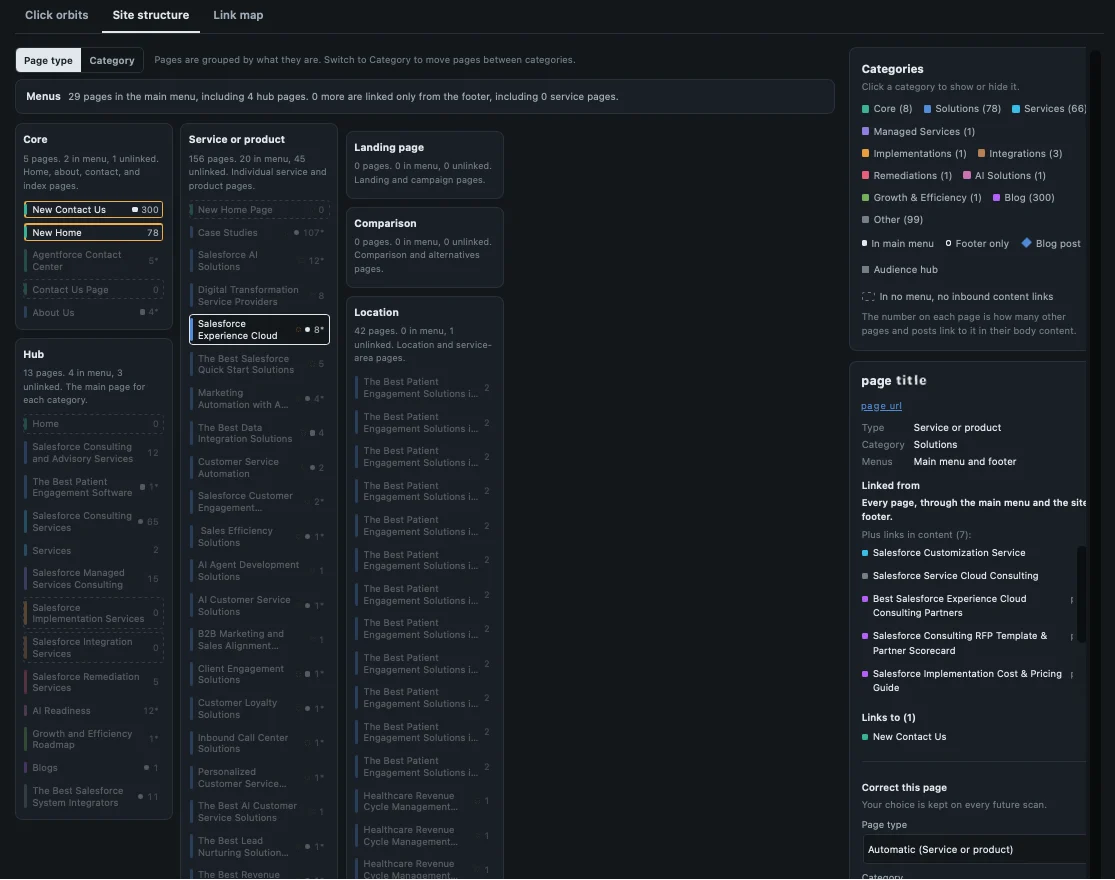
Rearrange it your way
Drag pages and posts into the categories where they belong. The links stay true to what's actually on your site, so once the pages sit where you want them, the missing connections are easy to spot.
Follow the plan
SiteGalaxy writes a step-by-step restructuring plan: what to move, which links to add or remove, which redirects you'll need, and the order to do it in. Export the maps as a PDF, the new page order as a CSV, and your sitemap data as a TXT file.
Free, Pro, and Agency
Start Free. Upgrade When You Need More.
Every version gets the full scan, the maps, and the complete restructuring plan. SiteGalaxy Free is on WordPress.org at no cost. Pro is $79 a year for up to three sites and adds scheduled scans, up to 20 categories, and customized visuals. Agency is $399 a year for up to 25 sites and adds white-label branding, client brand profiles, and a single dashboard for every site you manage.
| Feature | Free | Pro | Agency |
|---|---|---|---|
| Price | $0 | $79/yr | $399/yr |
| Full-site scan of pages and posts | |||
| Interactive link map | |||
| Click-depth view from the homepage | |||
| Site structure view by category | |||
| Drag-and-drop page / post re-ordering | |||
| Page categories | Up to 10 | Up to 20 | Up to 20 |
| Step-by-step restructuring plan | |||
| PDF, CSV, and TXT exports | |||
| Scheduled automatic scans | – | ||
| Customized visuals | – | ||
| White-label branding and client brand profiles | – | – | |
| Multi-site management from one dashboard | – | – | |
| Sites per license | Any | 3 | 25 |
| Get started | Free WordPress Download | Buy Pro | Buy Agency |
Questions
Before You Download
Does my site data leave my site?
No. SiteGalaxy runs inside your own WordPress install, and every scan, map, and plan is stored in your own database. Your pages and content aren't sent anywhere. Pro and Agency check in with our store only to confirm your license key and deliver updates.
Will SiteGalaxy change anything on my site?
Not on its own. Scanning, mapping, and moving cards around in the structure view are all read-only. Your live pages, links, and menus stay exactly as they are until you or your developer act on the plan. The exports are files you download, so they don't touch the site either.
What's in the restructuring plan?
A step-by-step list of what to change and in what order: which pages to move into which category, which internal links to add or remove, and which URLs need redirects after a move. It's the same plan our team would work from, and every version of SiteGalaxy gets the full report.
Can I upgrade from Pro to Agency later?
Yes. You pay only the prorated difference for the rest of your license year, and the same key unlocks Agency right away. There's nothing to reinstall, and your scans, categories, and settings carry over.
What happens when my license expires?
SiteGalaxy reverts to the Free version. Nothing is deleted: your scans, categories, and plans all stay in your database. Until you renew, you work within the Free limits, so features like scheduled scans and anything past 10 categories are locked. Renew and everything unlocks right where you left off.
Do I need the free version installed to use Pro or Agency?
No. Pro and Agency are complete plugins you download from our store after checkout. When you install one, it takes over from the free version and keeps your existing scans and categories, so you don't have to start over.
What if the plan is more than I want to take on?
That's common, and it's what our team does every day. Book a 30-minute call and we'll walk through your map with you, then tell you plainly what it would take for us to handle the restructuring.
Talk to Sales
Rather Have Someone Do It for You?
The plan is thorough, and some of it takes time to carry out. If you'd rather hand it off, we have an expert team of content strategists who can help! Book a 30-minute call and we'll look at your map together.
Talk to SalesSite Structure and Search
Why Structure Matters for SEO, AEO, and GEO
What is internal linking, and does it help SEO?
Internal linking means linking from one page on your site to another. It helps SEO because search engines follow those links to find your pages and use them to judge which pages matter most. The link text also tells them what each destination page is about. SiteGalaxy's link map shows every internal link on your site, so you can see which pages are well supported and which are left on their own.
How many internal links should a page have?
There's no magic number. A page should link to the other pages a reader would reasonably want next, and your most important pages should have plenty of relevant links pointing to them. Trouble starts at the extremes: key pages with almost nothing linking in, or pages stuffed with links that don't belong. SiteGalaxy shows how each page is connected, and your plan lists exactly which links to add or remove.
How do I plan a website structure?
Start by grouping your pages into a handful of clear categories, each with one main page the rest support. Keep important pages within three clicks of your homepage, and link related pages to each other. The hard part on an existing site is seeing what you actually have. SiteGalaxy scans it, lets you drag pages into the categories you want, and writes the plan to get there.
What are orphan pages, and how do I find them?
An orphan page is one that no other page on your site links to. Search engines struggle to find orphan pages, and visitors usually can't reach them unless they know the exact URL. They tend to pile up after redesigns and old campaigns. SiteGalaxy finds them in one scan, and your plan tells you which pages should link to each one, or whether it should be redirected.
How do I see all the internal links on my website?
Most tools give you a long spreadsheet of links, which is hard to make sense of on a site with hundreds of pages. SiteGalaxy draws them instead. Each page is a point on the map, each link is a path between two points, and moving dots show which way every link points. You can export the whole picture as a PDF.
Does website structure affect whether my site shows up in AI search?
Yes. AI search tools like ChatGPT find your pages much the way search engines do, by following your internal links. Pages with few links pointing to them look less important and are less likely to be surfaced or cited, and clear link text helps AI understand what each page covers. The structural fixes that help SEO also help answer engine and generative engine optimization (AEO and GEO), and SiteGalaxy's plan covers both.